Java Mod add-on: Java combat, F3, debug stick, offhand and nether roof
You play Bedrock but miss things from Java Edition? The Java Mod brings them over: Java combat with attack cooldown, the F3 screen with all coordinates, the debug stick to rotate blocks, any item in your offhand – and you can get onto the nether roof and even build there.
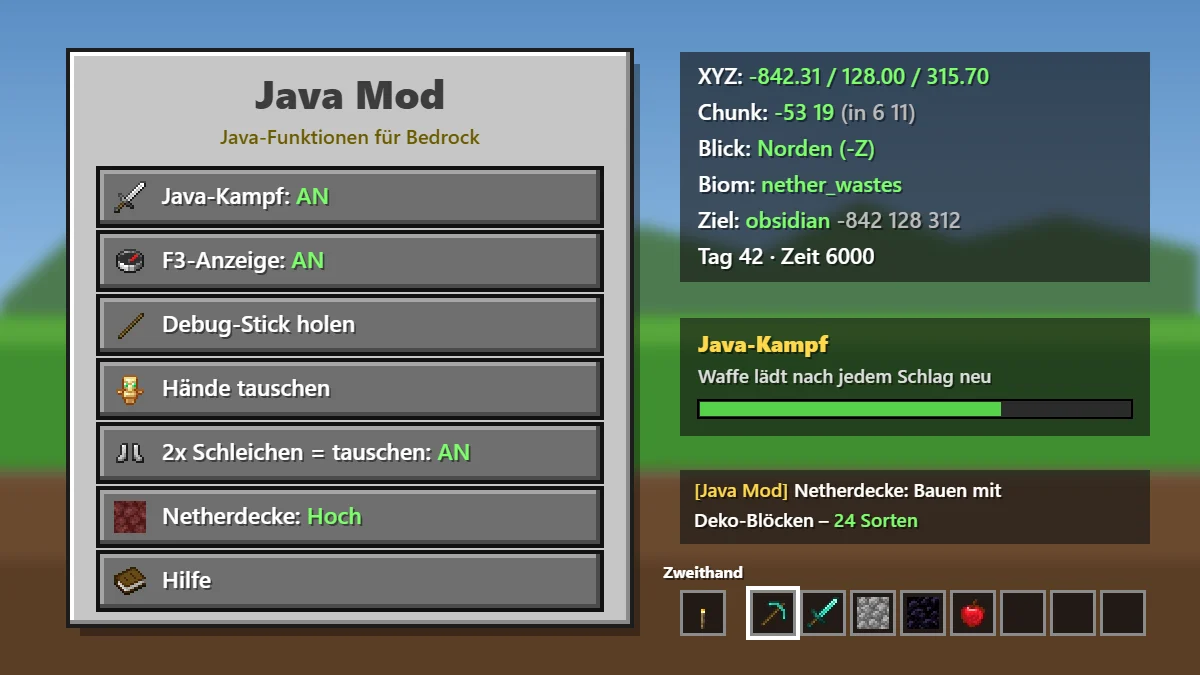
What the add-on does
- Java combat: after every hit your weapon recharges (bar at the bottom). Spam clicking only does 20 % damage – wait and you hit for full damage. Cooldowns like in Java: sword 0.65 s, axe 1–1.25 s, fist 0.25 s
- Sweep attack: a fully charged sword hit also hits enemies right next to the target
- F3 screen: exact coordinates, facing (north, south …), chunk, biome, the block you are looking at, day and time
- Debug stick (Creative): rotate stairs, flip slabs to the top, change fence sides – sneak + tap picks the property
- Offhand like in Java: sneak twice quickly to swap main hand and offhand – so any item fits into your offhand
- Build from the offhand: torches or blocks in your offhand, pickaxe in your hand – tap to place the block. Logs, torches and stairs are rotated correctly
- Nether roof: in the Nether, go up onto the roof via the Java menu (no mobs, fast travel) and safely back down – never into lava
- Build on the nether roof: place, stack and break 24 kinds of decor blocks, e.g. stone, wood, glass, obsidian, quartz
- Turn everything on and off in the Java menu. Works together with all other Blockwerk add-ons. In-game texts are in German
How to install it
- Download the file java-mod.mcaddon and open it – Minecraft imports both packs.
- Edit your world and turn on „Java Mod (Verhalten)“ under Behavior Packs. No experiments needed.
- When you join the world you get the Java menu (a book). Use it to turn everything on and off.
- Lost it? Book + stick in the crafting table.
Questions and answers
Do I need experiments?
No. The add-on runs without experimental features, also on Realms.
Can I turn Java combat off?
Yes. Tap „Java-Kampf“ in the Java menu – then normal Bedrock combat applies to the whole world again.
Why decor blocks instead of real blocks on the nether roof?
Minecraft Bedrock blocks real blocks in the Nether above height 127 – no add-on can change that. Decor blocks look like blocks and you can stand on them, but they do not give light and do not work with redstone.
Does it work together with the statistics add-on?
Yes. Tip: there, sneaking 3 times opens your stats, in the Java Mod sneaking twice swaps your hands. If that bothers you, turn hand swapping off in the Java menu.
Which devices does the add-on work on?
On phones, tablets (Android and iPhone/iPad) and Windows with Minecraft Bedrock 1.21.90 or newer. On Xbox, PlayStation and Switch you cannot open add-on files.
Fan add-on by Blockwerk, not by Mojang or Microsoft. The files are checked – we have not been able to try it in-game on every device yet. Let us know if something does not work.