Statistics add-on: kills, deaths, blocks, mobs and 33 achievements
How many zombies have you defeated? How often did you die – and from what? How much stone have you mined? The statistics add-on counts everything you do in your world in the background and shows it on its own screen: kills, deaths, every block, every mob, distances, play time, food, achievements and a leaderboard for all players.
⬇ Download Statistics add-on: kills, deaths, blocks, mobs and 33 achievements (.mcaddon)
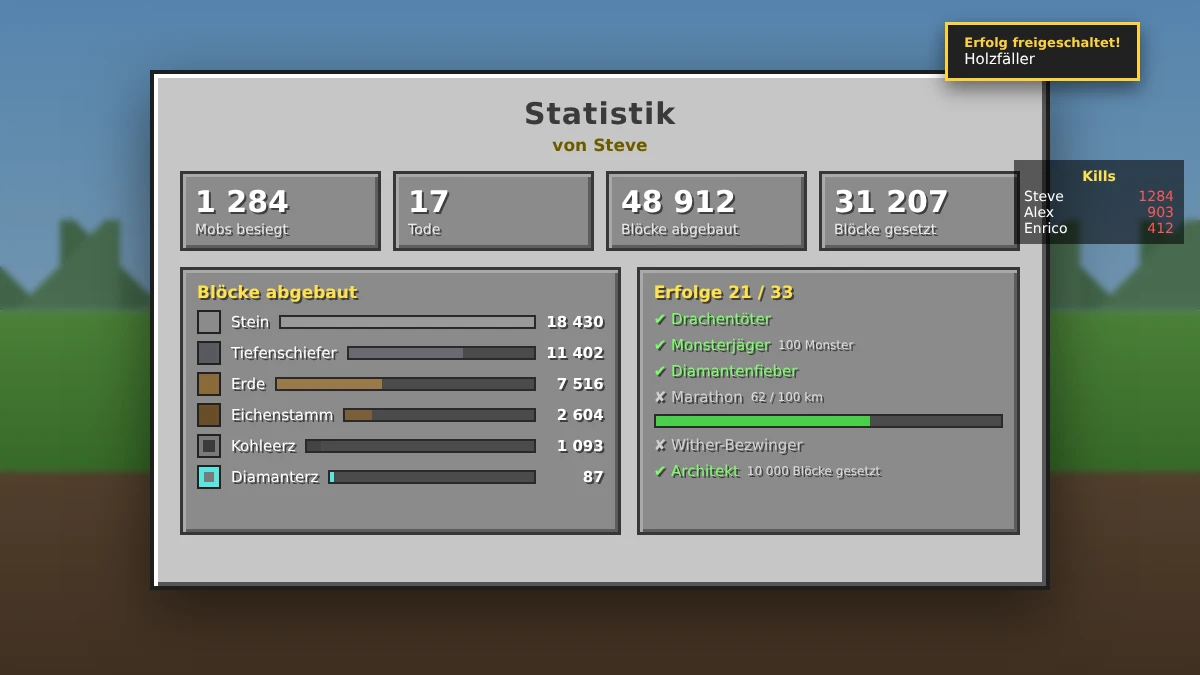
What the add-on does
- Statistics screen: use the statistics book or simply 3× Sneak, then Jump – the most important numbers at the top, below that a page for every area
- Kills: defeated mobs sorted by type (e.g. 312 zombies, 87 creepers, 1 Ender Dragon), player kills and your best kill streak in one life
- Deaths: how often you died and from what (fall, lava, drowning, killed by a creeper …) and your longest life
- Blocks mined and placed: in total and for every single block, as a ranking
- On the move: distance walked, sprinted, swum, glided with elytra and ridden, jumps, highest and lowest point
- More: play time, times joined, damage dealt and taken (in hearts), food eaten and drinks, highest level, dimensions visited
- 33 achievements with progress bars, e.g. Lumberjack, Diamond Fever, Dragon Slayer, Marathon (100 km), Survivor – with a pop-up when you get one
- Leaderboard of all players who have been in the world: kills, deaths, blocks, play time, distance, achievements
- Live display on the right side of the screen (scoreboard) for everyone, e.g. who has the most kills
- View other players: open the statistics of friends in the world
- Everything stays saved, even after a restart. German and English, works together with all other Blockwerk add-ons
How to install it
- Download the file statistik.mcaddon and open it – Minecraft imports both packs.
- Edit your world and activate “Statistik (Blockwerk)” under Behavior Packs.
- When you enter the world you get the statistics book. From now on everything is counted.
- Use the book (long press or right-click) or just sneak 3 times and then jump to see your statistics. You can turn the quick key off in the book. Lost it? Book + paper in the crafting table.
⬇ Download Statistics add-on: kills, deaths, blocks, mobs and 33 achievements (.mcaddon)
Questions and answers
Does it count what I did before the add-on?
No. Minecraft Bedrock does not give add-ons access to old numbers. Everything is counted from the moment the add-on is active in the world.
Do I lose my numbers when I die?
No. Everything is saved on your player and stays after death and after restarting the world.
What is the live display?
In the statistics book under “Live display on the side” you pick a number (e.g. kills). Then all players see a ranking on the right side of the screen that updates every 5 seconds. “Off” removes it again.
Do kills by my dog count?
Yes. What your tamed animal defeats counts for you.
Which devices does the add-on work on?
On phones, tablets (Android and iPhone/iPad) and Windows with Minecraft Bedrock 1.21.30 or newer. On Xbox, PlayStation and Switch add-on files cannot be opened.
Fan add-on by Blockwerk, not by Mojang or Microsoft. The files are checked – we have not been able to try it in-game on every device yet. Let us know if something does not work.