Beacon with Pyramid
- DifficultyMedium
- Size5 × 5 blocks
- Build timeabout 20 minutes
A beacon shoots a beam of light into the sky and gives you strong effects like Haste or Speed nearby. Perfect next to your mine or base.
It needs a pyramid of mineral blocks. The bigger the pyramid, the more effects you can choose from.

🔍 Click on parts
Tap any part of the build in the 3D model – a lamp, a tree, a bench next to the house – and you’ll see exactly how to build that part, with its materials and a layer-by-layer plan.
🧊 Build it as a hologram in Minecraft Bedrock (HoloPrint)
Download this build idea as a .mcstructure file – it is made right from the blueprint below. The HoloPrint website turns it into a pack that places the build as a see-through hologram in your world – you just fill in the blocks.
- Tap the button above – the file beacon-pyramid.mcstructure is downloaded.
- Open the HoloPrint website.
- Upload the file there.
- Create your build template texture pack.
- Download the .mcpack file.
- Open it with Minecraft and activate the pack in your world.
- Place an armor stand – the build template appears there. Tip: put it exactly where the build should stand.
Works with Minecraft Bedrock (phone, tablet, console, Windows). HoloPrint is a free fan project, not made by Blockwerk.
Layer-by-layer blueprint
Click through from bottom to top. Every square is one block, the front is at the bottom. Gray shows the layer below. 3 layers, area in the plan: 7 × 7 blocks.

Layer 1 of 3 (29 blocks)
- Block of Iron25
- Oak Fence4
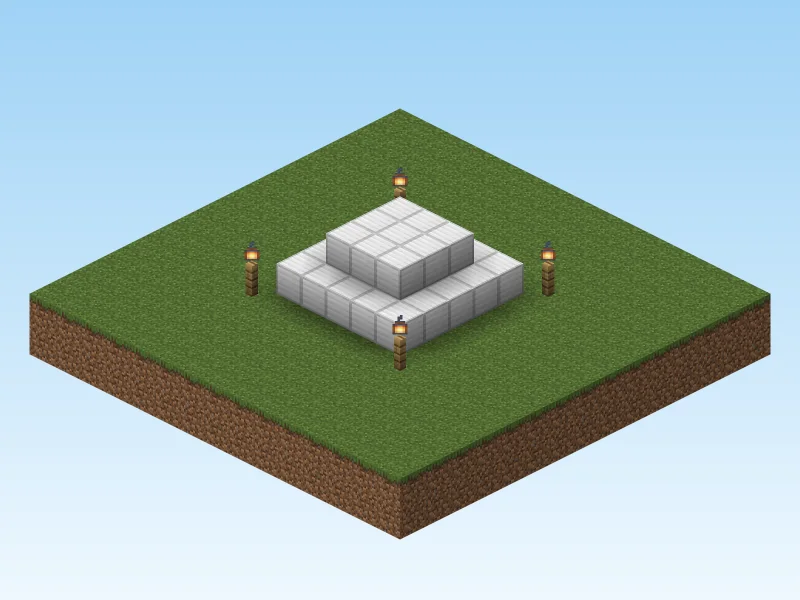
Layer 2 of 3 (13 blocks)
- Block of Iron9
- Lantern4

Layer 3 of 3 (1 blocks)
- Beacon1
Simplified blueprint: stairs and slabs are partly shown as full blocks, animals and plants as small squares. Tip: use the arrow keys ← → to switch layers.
Step-by-step guide
Craft the beacon
You need 5 glass, 3 obsidian and a Nether star. You only get the Nether star by defeating the Wither.
Level 1
Place a 3 × 3 area of mineral blocks. You can mix iron, gold, emerald, diamond and netherite freely.
Bigger levels
For more effects, build bigger layers underneath: level 2 needs an extra 5 × 5, level 3 7 × 7 and level 4 9 × 9 blocks. Our blueprint shows level 2.
Place the beacon
Put the beacon in the middle on top. There must be open sky above it – only transparent blocks like glass are allowed.
Choose an effect
Open the beacon, insert an iron ingot, gold ingot, emerald, diamond or netherite ingot and choose an effect.
Pro tips
- Stained glass above the beacon colors the beam.
- Level 4 needs 164 blocks in total – a really big project.
Variations
- Build the pyramid into a temple or tower – the beam then comes out at the top.
- Several beacons on one big pyramid look spectacular.


