Wave Pool with Sandy Beach
- DifficultyMedium
- Size93 × 74 blocks, 11 tall
- Build timeabout 4 hours
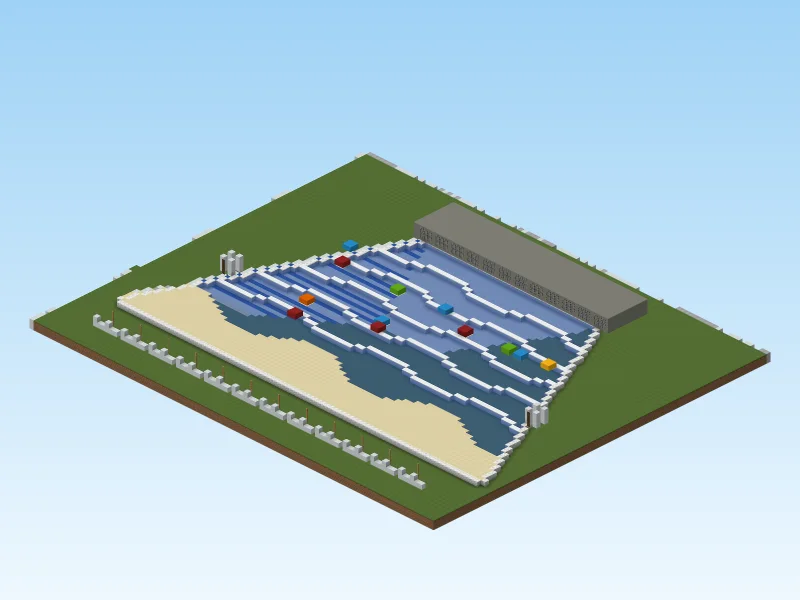
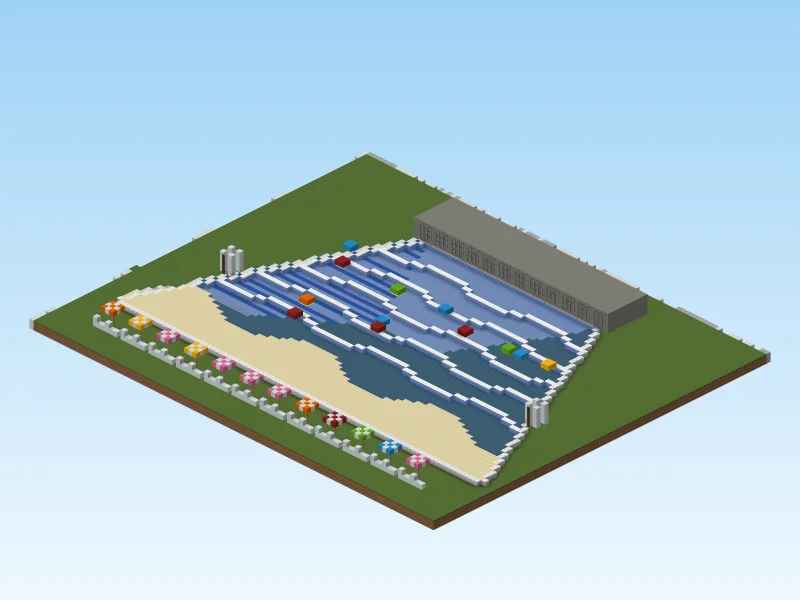
In the wave pool you feel like you're at the sea: at the back a big wave machine makes the waves, at the front the water runs out shallow onto a sandy beach.
White foam crests roll across the water and colorful rings float everywhere. Loungers under parasols, palm trees and two lifeguard towers line the beach.

🔍 Click on parts
Tap any part of the build in the 3D model – a lamp, a tree, a bench next to the house – and you’ll see exactly how to build that part, with its materials and a layer-by-layer plan.
🧊 Build it as a hologram in Minecraft Bedrock (HoloPrint)
Download this build idea as a .mcstructure file – it is made right from the blueprint below. The HoloPrint website turns it into a pack that places the build as a see-through hologram in your world – you just fill in the blocks.
- Tap the button above – the file wave-pool-with-beach.mcstructure is downloaded.
- Open the HoloPrint website.
- Upload the file there.
- Create your build template texture pack.
- Download the .mcpack file.
- Open it with Minecraft and activate the pack in your world.
- Place an armor stand – the build template appears there. Tip: put it exactly where the build should stand.
Works with Minecraft Bedrock (phone, tablet, console, Windows). HoloPrint is a free fan project, not made by Blockwerk.
Layer-by-layer blueprint
Click through from bottom to top. Every square is one block, the front is at the bottom. Gray shows the layer below. 12 layers, area in the plan: 93 × 74 blocks.

Layer 1 of 12 (3809 blocks)
- Water2351
- Sand905
- White Wool313
- Calcite240

Layer 2 of 12 (632 blocks)
- Light Gray Concrete490
- White Concrete80
- Red Concrete16
- Light Blue Concrete16
- Oak Fence12
- Lime Concrete8
- Orange Concrete4
- Yellow Concrete4
- Ladder2

Layer 3 of 12 (572 blocks)
- Light Gray Concrete490
- Iron Bars36
- White Concrete32
- Oak Fence12
- Ladder2
Layer 4 of 12 (548 blocks)
- Light Gray Concrete490
- Iron Bars36
- Oak Fence12
- White Concrete8
- Ladder2
Layer 5 of 12 (644 blocks)
- Light Gray Concrete490
- White Concrete56
- Iron Bars36
- Pink Concrete25
- Orange Concrete10
- Yellow Concrete10
- Red Concrete5
- Lime Concrete5
- Light Blue Concrete5
- Ladder2

Layer 6 of 12 (548 blocks)
- Light Gray Concrete490
- Iron Bars36
- White Concrete8
- Pink Concrete5
- Orange Concrete2
- Yellow Concrete2
- Ladder2
- Red Concrete1
- Lime Concrete1
- Light Blue Concrete1

Layer 7 of 12 (544 blocks)
- Light Gray Concrete490
- Iron Bars36
- Birch Planks18

Layer 8 of 12 (528 blocks)
- Light Gray Concrete490
- Iron Bars36
- Red Concrete2

Layer 9 of 12 (541 blocks)
- Light Gray Concrete490
- Light Blue Concrete49
- Oak Fence2

Layer 10 of 12 (557 blocks)
- Light Gray Concrete490
- Light Blue Concrete49
- Red Concrete18

Layer 11 of 12 (539 blocks)
- Light Gray Concrete490
- Light Blue Concrete49

Layer 12 of 12 (612 blocks)
- Gray Concrete612
Simplified blueprint: stairs and slabs are partly shown as full blocks, animals and plants as small squares. Tip: use the arrow keys ← → to switch layers.
Step-by-step guide
Pool shape
The pool gets wider towards the front, like a fan: 44 blocks at the back, almost 90 at the front. The edge is calcite.
Water and beach
Fill the pool with water. In the front part add sand – with a wavy edge, so it looks like a real beach.
Waves
Place rows of white wool across the pool as foam crests, slightly wavy.
Wave house
At the back stands a long building of light gray concrete with iron-bar grilles – the wave machines work behind them. A light blue band runs along the top.
Beach
Set up parasols in many colors with two loungers each in a long row.
Lifeguards and rings
Build a lifeguard tower of white concrete with a red roof on both sides and let colorful swim rings float in the water.
Pro tips
- There are no real waves in Minecraft – but the white stripes create the effect.
- In creative mode the /fill command is much faster: it fills whole walls and areas at once.
Variations
- Build a surf wave with a standing wave for surfing.
- Put a big screen on the wave house for movie nights.


